Google I/O 2013 – Keynote Highlights

Google I/O 2013 Logo

Google commenced the 6th annual developer conference, Google I/O, in San Francisco yesterday.

The conference began with the three and a half hour keynote address revealing Google’s innovations and future plans across their broad spectrum of platforms. The keynote even featured a surprise appearance from Google CEO Larry Page.

Although there was no announcement of Android 4.3 as many had expected, there were some exciting, innovative announcements worth shouting about.

Here’s a brief recap of Google IO Day 1, we’re going to keep this round up short and sweet – enjoy!

All New Google Maps

One of the biggest and highly anticipated announcements at Google I/O was the launch of the all new Google Maps.

Featuring new innovations such as satellite pictures with ‘real time clouds’, the ability to draw tailored maps for every search a user makes highlight the things that matter most, and improved interaction showing a broader range of helpful information, the new Google Maps promises to be a more intuitive next generation of maps.

If you’re interested you can request an invite to the new Google Maps or read on the Google Latlong Blogspot.

Newly Designed Google +

Another huge announcement was the changes coming to Google+. It was announced that over the coming year Google+ will see the introduction of 41 new features related primarily to the stream, hangouts and photo section of Google+.

One of the major changes, available now, is the move from a single column to a multi-column design depending on the size and orientation of the users screen.

Google+ Multi-Column View

Many people have already pointed out similarities between the new Google+ layout and the likes of Facebook and Pinterest which may have heavily influenced Google’s move to the new design.

Google also announced the introduction of a new feature called related hashtags, automatically providing hashtags related to stories within the stream, allowing the user to follow up on a particular topic. Hash tags have been available within Google+ since birth, however this is a big move to promote this functionality within Google+, presumably in an attempt to rival the massive hash tag usage of Twitter.

In addition to these awesome features Google also announced various changes to hangouts including richer and more responsive messaging, conversation history, free 1-to-1 or group video calls, with a stand-alone app for Android and iOS devices and PC platforms.

Also there are various improvements to photos including auto backups, highlights, improved/auto photo enhancement tools.

Visit the Google+ Project to see all the lovely Google+ enhancements and niceties.

Multi-Screen & Conversational Search

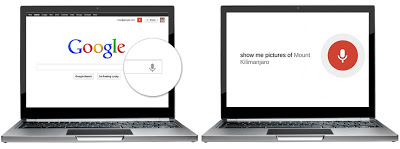
Amit Singhal unveiled the new “conversational search” a Google development which will provide a search engine that can answer your questions. Singhal signalled that simply saying “OK Google,…” followed by a question Google will be able to communicate with a user, and provide relevant information without the user having to ask.

Multi-screen Search

In the Google Inside Search blog Singhal mentions various improvements to knowledge graph to provide better/smarter answers to questions.

Read the full story from Amit Singhal here – http://insidesearch.blogspot.com/2013/05/a-multi-screen-and-conversational.html

Google Play Music All Access Subscription Service

Google Play Music All Access is a subscription based music streaming service set to rival similar streaming services such as Spotify. With the ability to combine Google Play Music with a users own music collection via the cloud, Google’s Engineering Director Chris Yerga call All Access “This is radio without rules”. No doubt this announcement will not go down well with Spotify, nor with Apple who have reportedly considered launching their own music service.

Here’s AndroidCentral’s look at All Access.

New Google Now Cards

Six new cards will soon be launched for Google Now, Google’s app for finding answers to user-initiated queries. The new cards include reminders, which automatically notify you when you have appointments or plans, a public transport search as well as music, TV shows, books and video games.

Read more here – http://www.engadget.com/2013/05/15/google-now-updated-with-reminders-real-time-public-transit-upda/.

Samsung Galaxy S4 on Google Play

Google have teamed up with Samsung to deliver an all new version of the Galaxy S4. Available to buy in the US in June the new Android device has been developed especially for Google Play combining Google’s top of the range software applications with Samsungs cutting-edge hardware. Available up to 16Gb with 4G LTE support, the handset itself will run a core version of Android 4.2 and will remain completely unlocked with a full unlocked bootloader, great for developers! The fact that the handset will run the core version of Android will bode well with users, allow them to upgrade to each new version quickly and easily.

Read more here – http://www.gizmodo.co.uk/2013/05/whoa-googles-selling-a-pure-android-samsung-galaxy-s-4-on-google-play/.

Google Wallet & Gmail

Google have integrated Google Wallet into Gmail, allowing users to quickly and easily send money to Gmail and non-Gmail email addresses, for free!

Find out more bout sending money via Gmail on the Google Commerce blog.

Google I/O 2013: Keynote

If you’ve got a spare 4 hours you can watch the full keynote from Google I/O 2013 here!

What to Expect on Google I/O 2013 Day 2?

Well there you have it, that the round-up of day 1 at Google I/O 2013. There are a lot of Google I/O sessions on the agenda for day 2 so we’ll keep an ear to the ground for any new announcements. Perhaps the eagerly awaited launch of Android 4.3? You can also follow all of the days events for yourself using the #io2013 hashtag.

Don’t forget you can also follow High Position on Twitter and Google+ for all the latest Google I/O 2013 developments!

What Do You Think?

What are your thoughts on the first day of Google I/O? Are you excited by any of the developments? Do you think Google have over-stepped the mark with the Facebook/Pinterest style G+ interface? Disappointed Android 4.3 wasn’t announced?

We’d love to hear your thoughts! So please feel free to leave a comment!

PS: Google Support for Organisation Logo Schema.org Markup

Expanding their support for Schema.org markup, Google announce yesterday (not at I/O!) support for organisation logos, allowing business to specify which image Google use as the business logo within search results.

Read more and see examples at the Google Webmaster Central Blog.

The Brand Bidding Debate

To Bid, Or Not To Bid…

At High Position we take ROI seriously and aim to use PPC budgets as efficiently as possible, generating cost effective clicks, which convert well and achieve a healthy CPA. One topic we are constantly debating with clients is the process of bidding on branded terms when a site is organically in the top spot. So, I thought it was about time that I dig deep for the reasons in support of, and against bidding on brand terms and compare them to studies conducted by Google and independent sources – as well as our very own test which is in the making!

Pro Bidding on Brands

“Maximise your presence and dominate above the fold search results”

Google is gradually moving further towards an above-the-fold domination of paid results – strangely enough this will probably mean they will generate more revenue as users are manipulated to choose paid results! By offering more and more ad extensions, this allows paid adverts to take up more space, and generate more Google revenue. But…these are also very advantageous to advertisers. By making the most of the various extensions we can take up hundreds of extra ad pixels – for free! The more screen space you can own, the more likely you will be to catch the attention of searchers and generate more clicks.

“Control and tailor your message – as often as you want to”

We all know that a good meta description can improve organic visits – but the reality is that in 160 characters we need to summarise the organisation and slip in a few generic keywords for SEO benefit. We can’t promote every offer or work in real time with whatever is “hot” right now – instead we let Google decide what to list, hoping they will use a well written meta description. Another feature of paid ads is having total control over content, allowing you to promote offers, test call to actions and master the appeal that’s needed to keep improving Click Through Rate.

“Tell people lots of things in one ad”

With Ad Extensions, you can not only try to dominate the page, you can provide several other options and cover all bases. From additional, helpful, links to telephone numbers and printable coupons you can try giving them exactly what they want in an advert –a lot more appealing than an organic listing I’d say!

“Prevent your competitors from stealing your business”

Unfortunately, you can’t stop people from bidding on your branded keywords. It might cost them a lot due to having a low quality score but not competing with the competition is as bad as letting your competitor hand out “buy from us, not them” flyers to customers as they go to walk through the shop door.

“Is your brand name ambiguous?”

Some brands have less unique names and find themselves fighting for organic stability! If this is the case, the best way to stand out and secure first page visibility is to bid on branded terms. Make sure people know they are clicking on the right link and finding exactly what they are meant to find!

“Improve your quality scores by upping CTR”

Part of Google’s quality score algorithm uses previous ad success – or Click Through Rate to deem whether your ads are what people want to see! After all, the more people want to click on a set of ads, the more money Google will make! So, how does this help your campaign? By using branded campaigns – which typically have the best Click Through Rates, your whole campaign can over-time achieve better Quality Scores. Better quality scores mean lower CPCs and better Average Ad Positions! Siddharth Shah explores CTR v.s. Quality Score in more detail here.

“Professional Appearance”

Some brands argue that web users expect “good brands” to be present in paid and organic results. Theory suggests this instils more trust in a search user as the brand is visible in two areas – meaning the brand must be doing something right?!

Against Brand Budget

“Why waste budget when they will find us anyway?”

Sure, you will be there in the first spot for your brand organically so if people want to particularly use your service or find your product then maybe they will look for your organic listing. If this is the case, then a chunk of PPC budget can be freed up to target new customers who are searching with generic keywords. We are also all familiar with the logic that says keeping a customer coming back is 10 times easier, and cheaper, than going after new ones! Plus, a large proportion of searchers will only click on organic listings which have earned their way to the top, but, when Google is gradually dominating above the fold results with paid listings, will it take much for a fickle audience to click on the first thing that ticks their boxes?

“Bidding on brand will only upset my affiliates”

A fair point indeed! Having a naturally great quality score (because you are the keyword!) will most likely mean that any affiliate sites will have to pay a higher CPC. But, on the plus side, having your brand in the mix will reduce the chances of clicks going to competitors as much as their chance of gaining more clicks.

Proof is in the Pudding

So, the arguments are solid, but where is the evidence and who has done their research?

Several companies – including Google – have conducted tests and found the following results which concluded that overall search revenue increases with both paid and organic presence.

So, here is what Google says: 

Google Research - Impact of Organic Rank on Ad Click Incrementality

But we also dug around for some less bias results:

From PPC Associates:

“…test shows that brand keywords increased total brand conversions (SEO+SEM) by around 10% even though competition was rare on both paid and organic listings”

From Econsultancy:

“… investment in brand paid search delivers incremental revenue. As soon as we paused the ads, the total revenue from search dropped and wasn’t fully compensated via other channels”

From Enquiro Research:
“When a brand name is the top result in both natural and paid search results, 83% of consumers looking to buy would consider a purchase. Without paid search, however, the same brand name as the top result in organic search only obtains 73% purchase consideration”

But, does your industry matter?

So, AdWords textbooks say that bidding on branded keywords is a no brainer. But is this really true for all industries, and all companies? What about the small proportion of monopoly industries – and do such things even exist?

We are examining the common arguments against bidding and will be testing the theories on a duopolistic client who has one direct competitor and a bunch of affiliates which all sell their product anyway. So, what better way to determine if investment in brand terms is worthwhile? Will the ROI for “lost” traffic captured via PPC be worthwhile for the ad spend for all branded PPC?…Will it only be worth bidding on branded terms during offer periods?…Wow! There are so many questions we could potentially answer here!

Keep checking back here, where we will keep you posted and update you with the results in the next couple of months!


Google’s PPC Paid Search Must Have Ticket! Part 1

Google requests the company of…

Google opened their doors last week for a special client/agency presentation, during which they detailed their vision for the future, and High Position had front row seats. Unlike many recent events, this one was at their King’s Cross office, not too far from the location of a NEW King’s Cross Headquarters which is set to be ready in 2016. The presentations were from a variety of sources including a couple of new businesses and a BBC journalist, not just Google Heads of Service, making it especially relevant for the clients we took with us. And not just from a PPC Paid Search perspective but from a much broader angle that took in new technology, consumer insights and the future of contextual targeting.

The King’s Cross Google office, complete with trees, a bag printing stand and a bar!

It was great for us to be able to give our clients access to some of Google’s top people and get an exclusive, behind the curtain look at one of the world’s biggest companies. Here are a few key points we were able to take away.

Connectivity and Identifying Opportunities

Mark Howe presented around the theme of ‘Connectivity’. Using figures that industry insiders have been monitoring for some years now, Mark used real examples of how businesses who out themselves in the right place at the right time, and use technology to do this, are breaking new ground in marketing and ways to generate new business. There was a great video of how Adidas had created a touch screen shop window that enabled viewers to browse products and interact with the store using their mobile devices. It took the experience of in store shopping, out onto the street!

Perhaps the most impressive example was the simplest. By collecting data about what people wanted, Cooper BMW in Thames Ditton were able to tell people via an email that the car they were looking for was now in their showroom. Mark was so impressed with this simple but effective use of data that he ultimately bought a car from the Thames Ditton dealership.

From a personal point of view it was interesting to hear Mark talk about the role Search Agencies have to play in identifying these opportunities and helping drive ‘Connectivity’. It’s the best Search Agencies that will be able to help implement the data capture, apply that data to a workable marketing strategy and report on the effect it has on a business. This skill, Mark was in no doubt, is a valuable commodity and should be treated as such.

There are known knowns; there are things we know we know…

Next up was Adam Shaw, a BBC Journalist, familiar to most from TV and radio including Radio 4’s Today Programme. Adam entertained us with his deconstruction of the type of economic figures we are fed every day in the news. At first the presentation seemed a million miles away from Google and all things Search related, but what emerged was the compelling idea that economic uncertainty and instability are the perfect breeding ground from which innovation and new ideas emerge. Adam backed up by showing how brands which now dominate our cultural landscape all started during periods of economic downturn; Burger King, Microsoft, MTV and Wikipedia.

The BBC’s Adam Shaw separating fact from fiction

A Contextual Revolution

Phil Miles, Google’s Director of Media Buying Solutions in the UK and Ireland brought things back to more familiar territory. He began by saying that it wasn’t impossible to see a future, 2020, where investment in audience targeting would exceed investment in search. At High Position we’ve always been interested in where all the advances in search marketing technology will lead, so it was interesting to hear Phil talk about contextual targeting and the move from targeting via content towards actual audience signals. It’s a move from volume to precision which could open up all sorts of avenues for businesses.

Last year we learned about advances in Google Analytics which would take targeting to a whole new level. Universal Analytics brought with it the idea of session based information to user based information. We immediately saw the potential this could have for targeting an audience. Rather than look at targeting based on which pages people visit we will be able to target based on the behaviour of those people, not only on your site, but on their browsing history. For example, we’ll be able to highlight visitors based on the amount of money they spend on line. Putting in place a spend threshold we can then decide the value of targeting a certain audience. People who spend more money per visit online are obviously high value and targeting that group is worth putting some money behind.

High Position’s Martin Roche shakes hands with one of the Google elves while trying not to spill his tea

Part 2 of this blog will be published next week. Come back then to find out what Responsive Design, Taxis and Steve McClaren have in common.

How to set up Google Authorship / Rel Author Markup

How to Setup Google AuthorshipOver the last year or so I have found that more and more new clients are aware they need to create a content strategy for their websites and know they need to tie this in with their social strategy; but surprisingly some are still unaware of Google+’s authorship markup and the importance it plays in a successful strategy.

Tom wrote a great article about Authorship and why it’s important for SEO, so I’m not going to explain this here. Instead, I have compiled a quick guide on how to set up Google authorship and I also want to make you aware of a few recent updates Google have introduced to the process.

What are we trying to achieve?

The principal idea is to link your Google+ profile and your content together. This is so that Google understands you as an author, understands your content on the web, and can as a result use the association to add authorship information to search results:

Authorship Example

Setting up Google+

Before we start, you are going to need a personal Google account with your Google+ profile set up. If you don’t have one already, then remember, when setting the account up, that Google will use your G+ profile name to help link to your byline or bio name, so make sure the account is specific to you and not a shared account.

Option 1 : Setup Authorship using a verified email address.

Once you have an account, the quickest way to get your authorship set up in G+ is to complete the G+ profile link page. This allows you to verify a valid email address with the domain you are trying to associate your Google+ account with.

For example, if you want to set up authorship for www.domain.com and have a domain email address (myname@domain.com) then submit that to Google, verify and Google will automatically set up a contributor link to your profile and associate your content with your profile. Simple!

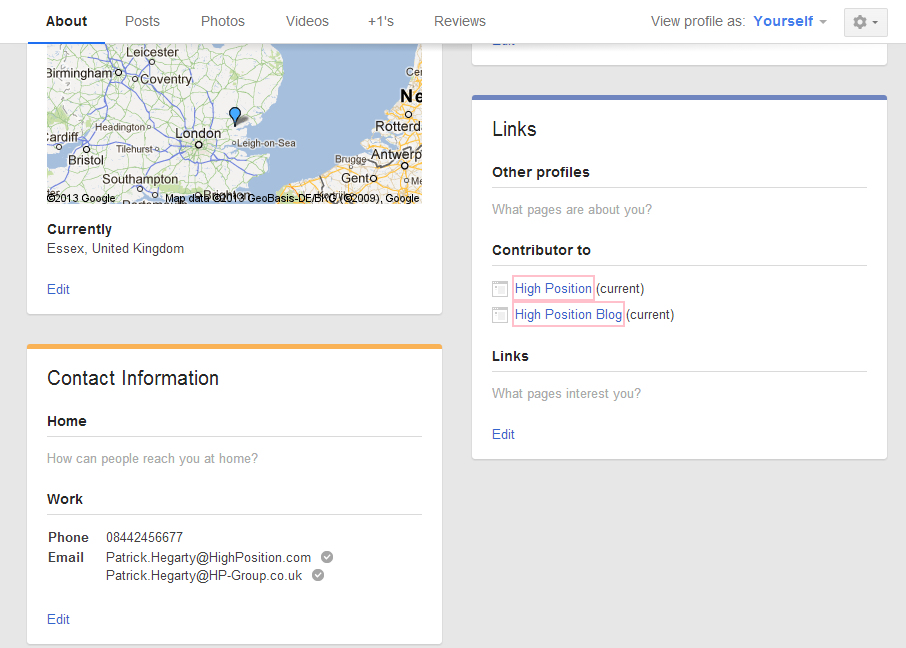
G+ Example of Contributor and Emails

Option 2 : Setup Authorship by linking to your Google+ Profile

If you don’t have an email address on the same domain as the website, don’t worry, you can set up authorship by adding your website to the ‘Contributor To’ section in G+ and then adding a ?rel=”author”  link on your website. This was one of the original ways authorship could be verified, which is why we have it set up on our blog.

You can find the ‘Contributor To’ in Google+ here:

About > Links > Contributor To

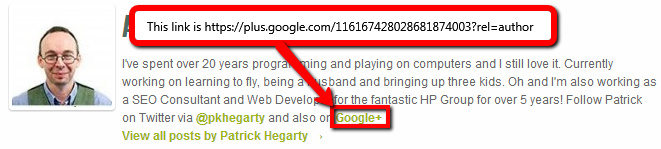
Below is an example of the the rel author link in my Author Bio. Note the link should be structured as follows:

https://plus.google.com/myuserid?rel=author

G+ Link Example

By setting up links on both the website and a your contributor list you verify that you are who you say you are and that you have access to the site.

If all goes to plan, within a few days you should hopefully start to see your picture in the search results :)

Issues And Options

The current documentation from Google states that if you have a email address on the same domain as your website then you don’t need the link back from the site, as long as each article has a byline with the same name as your G+ profile. We’re still waiting to see how well this is working, so would recommend adding the G+ link from your website as well.

We would also strongly suggest testing and verifying how Google views your authorship by using the Structured Data testing Tool from Google’s Webmaster Tools and if you can’t see your authorship details in the search engines results, we’ve found that being logged in can cause this issue.

IMPORTANT TIP - The final tip we would suggest for ensuring your picture shows in the search results is making sure your Google+ profile information is well filled out and most importantly, that your profile picture is a good clear head shot. If it isn’t recognisable then there’s a good chance that Google will refuse to show your picture in SERPs.

Have any questions or gripes with getting Authorship set up? Have a tip on getting your picture listed in SERPs? Please leave a comment below to tell us your story and experiences with Google Authorship.

Google Begins Tackling Domain Crowding & SERP Diversity

It’s no secret that Google’s SERPs have been full of domain crowding for quite some time now. It’s a massive issue in some niches where a dominant domain can essentially take over the entirety of the first page of results.

The good news is that Google seems to be making a strong attempt to fix things lately.

What is domain crowding?

For those that haven’t come across this term before, I should probably quickly explain it. A domain crowd is anywhere you see sequential results in the SERPs from the same domain. Here’s an example in the [hotel reviews in glasgow] SERP where tripadvisor.co.uk has 3 sequential results on page 1:

Domain crowding became a bigger issue in the SERPs after the notorious Bigfoot Update that Dr. Pete wrote about on SEOmoz back in June.

The process

As I’ve mentioned before, we track around 50,000 unique keywords daily across G/Y!/B so we have a good set of data to play with. As with my EMD Update post a couple of months back, I’ve used a random selection of 5000 keywords to create an unbiased dataset.

All of this SERP analysis has been carried out on Google UK, but given the fact that flux seems to mimic US SERPs these days I think it’s safe to assume that algorithmic updates normally happen in unison now (although this is not necessarily true for ‘red button’ updates like Panda or Penguin refreshes).

I deliberately looked at quite a large timeframe for this study (blue box above) as there were mumblings of SERP diversity changes over the period of a few days despite SERPmetrics not reporting any single stand-out high volatility day during it. For these reasons, I’ve compared data from Nov 30th with Dec 6th.

Also, Mozcast showed a definite uptick in domain diversity over this timeframe so it certainly warranted further investigation (update: as well as a stormy weather day on the 5th).

For each of the 5000 keywords, I looked at the top 100 organic results and made a record any time I came across a ‘crowd’ of results (2 or more sequential results from the same hostname).

For each domain crowd I recorded the start position, the finish position and the number of results spanned. I didn’t look specifically at pages and, so, domain crowds could span them.

Anyway, enough of the rambling – let’s look at the results.

The results

Over the test period, occurrences of domain crowding (2 or more sequential results from the same hostname) have fallen from 51,384 to 43,606. That’s a difference of:

-15.14%

The actual number of results within a domain crowd fell from 156,038 down to 135,222 – a similar drop of -15.34%; but this alone doesn’t tell the whole story. Many people will say that 2 sequential results isn’t really crowding, so let’s look at the effect on different size crowds:

The number of occurrences for 2-result crowds far outweighs the bigger blocks so this isn’t easy to see, but you can fairly accurately determine at a glance that the numbers have dropped significantly. A better view would likely be the % change rather than actual numbers though:

Now it’s easy to see that there is a strong drop of around 15% for each crowd size, but this diminishes from the 7-block upwards which only saw a change of around -5%.

Personally, I would have expected to see increases in the lower sized crowds when the bigger crowds were being dispersed but these numbers tend to imply that multi-result crowds of all sizes have been reduced to singular results in a lot of instances.

Really? I didn’t notice much change

Well, there might be a good reason for that. I split the data into page buckets (1-10, 11-20 etc) and it flagged up an interesting anomaly. Domain crowding on Page 1 of the SERPs only saw a -5.5% change; so it seems most of the diversity clean-up happened below position 11:

Manage Your Way to Social Media Success

Are You Being Unsocial?

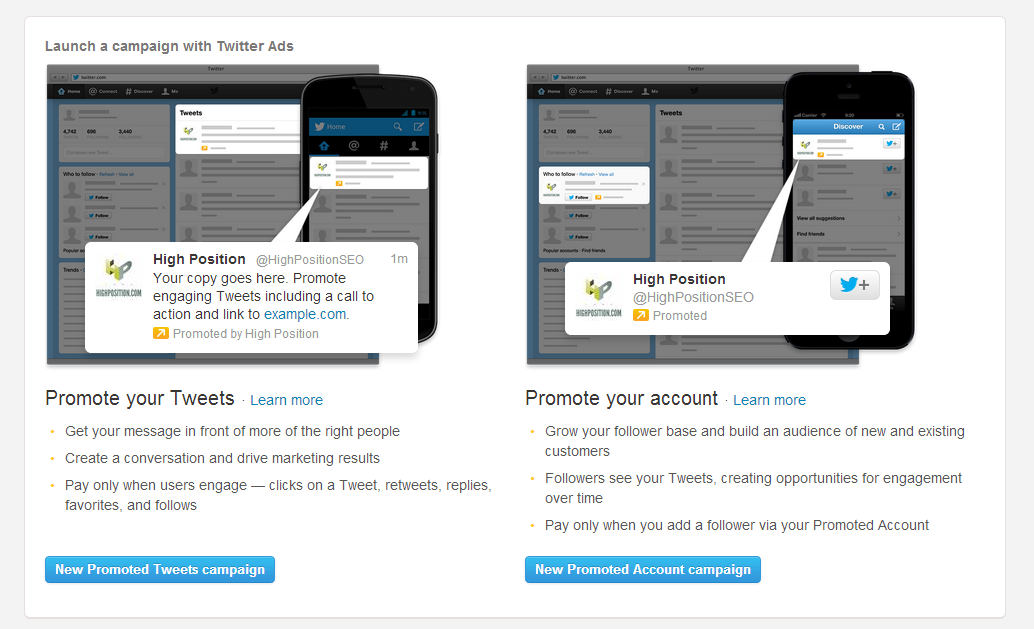
In 2013 the big Social Media players will continue to make inroads into online advertising with the aim of getting a piece of the Google pie. Sponsored stories on Facebook and Promoted Tweets on Twitter are already having an impact on the way we look at audience targeting and engagement.

You Cannot Afford to Ignore Social Media in 2013

This year we’ve seen big names like Facebook concede that there are things they need to change to make the user experience better. The latest development being that the ‘subscribe’ feature will be replaced with ‘follow’, a term that social media users will be familiar with through Twitter. But this aesthetic change will be minute compared to what could happen if Facebook does finally throw its weight into the paid search arena.

Being social is now a necessity but businesses are still looking at it in terms of box they need to tick, rather than a tool they can use to engage with an audience. Many commentators are saying that the future could see banner advertising as we know it overtaken by promoted posts and sponsored tweets. Whatever way you choose to engage with your audience via Social Media you need to manage it, and react to whatever is happening.

Too many businesses still think that Social Media is something to be controlled. Generally if you take a look at the stats behind this approach you’ll find very few signs of success; low follower numbers, non-existent re-tweets and likes from everyone employed by that business but nothing further afield than the front door!

Putting too much emphasis on controlling Social Media is like trying to stop the sun rising, it’s not going to happen and, although you might avoid negative feedback you’ll also avoid gaining new clients.

Top 5 Social Media Tips For 2013

Update Regularly

Don’t just tick the boxes. An idle Twitter, Facebook or G+ account not only adds no value but it can be detrimental to your business. People looking at your profile and seeing your last post dated four months ago will naturally assume that you’re not making much effort with social media, they might even see it as a sign your not the type of pro-active business they are interested in working with.

Be The First To React

Nobody wants bad publicity, and the way social media works you are likely to get comments or mentions that you’d rather were not out there associated with your brand or business. Whatever you do, don’t ignore it. Look at Social Media as a means to ensure that negative feedback is dealt with and then turn it into a positive. A car dealer set up a Facebook page and found that disgruntled customers were using it to vent their frustrations. He decided to reply to each comment and promise to respond personally within 20 minutes of getting some contact details. Every issue was then sorted out. The knock on effect was that his employees became even more aware of the need to provide good customer service, due to the immediacy of Social Media, and each situation was finished with an updated post or comment indicating that the customer was now satisfied.

Tell People about Latest Offers

Marketing departments are often guilty of promoting latest offers in ways that are not going to make the slightest bit of difference to the bottom line. Paid Search can offer you a window for your offers but if the keywords don’t connect then the response is going to be poor. Social Media offers a much better way to connect to an audience for a limited period of time. You can start a social ripple effect by putting your efforts into promoting offers via social media. The more followers or friends you have the more of a ripple effect you’ll be able to create, but the more effort you put into your social channels the better they will perform over time.

Keep your social channels updated and stimulate engagement

21st Century Communication Tools

People now use Social Media as a means to find news, research products and services and find entertainment. It’s as much a communication tool as the telephone. So why don’t businesses use it that way? If you can collect a person’s Twitter details at the same time as their phone number then you have the opportunity to send that person information via their Twitter feed. It’s also very personal so not only is it great engagement but it creates a relationship.

Not Content with Non-Content

At the route of your Social Media Strategy for 2013 should be good content. You may already have content that you can be proud of, but are you distributing it effectively through your social media channels? If you don’t have the content, why not? Remember it’s not about ticking boxes; this is about engagement, showing people why you are the best and creating a following that will enable your business to achieve great things in 2013.